What if this
signpost
moved with my phone?
As a designer I've been shifting my attention from how a thing looks to how it feels, and the fastest way to feel an interaction is to hold it in your hand.
The light-bulb moment came in San Francisco, under the Sister Cities signpost. One arm pointed to Seoul, my hometown, 5,600 miles away. I thought: what if this whole thing reacted to the gyroscope in my iPhone?
Building a high-fidelity motion prototype like that used to take a week. With AI, I vibe-coded a working Core Motion app in about two hours.
tilt to find the way
A cluttered sign, pointing home
The Sister Cities signpost in San Francisco stacks two dozen arms on one pole (Manila, Seoul, Ho Chi Minh City, Zürich, Amman), each with a bearing and a distance. It's gloriously busy, and standing under it I kept tilting my head to read the one pointing at Seoul.
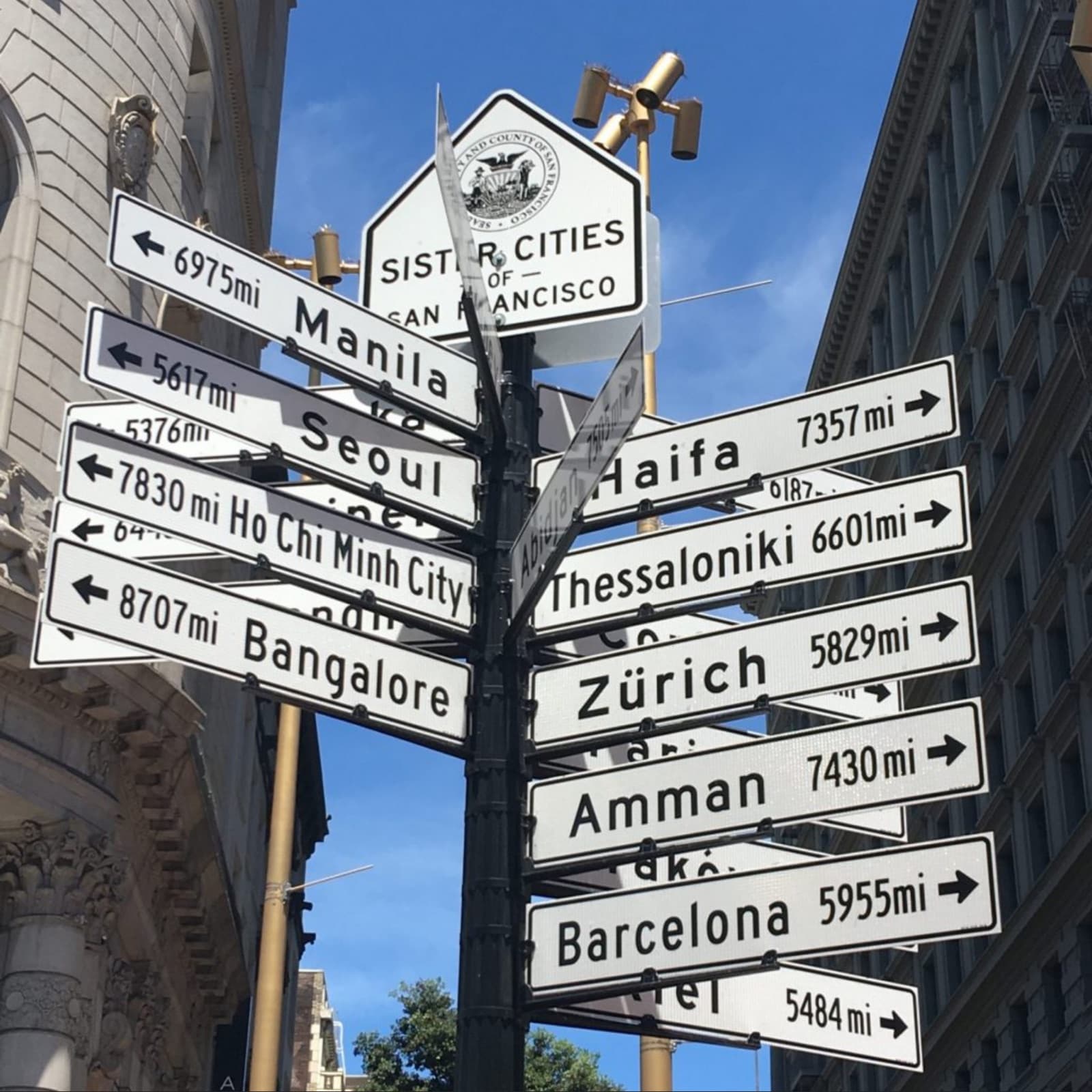
The Sister Cities of San Francisco signpost: the cluttered, tilt-to-read object that started it.
“What if this reacted to the gyroscope in my iPhone?”
That single question was enough to start building. Instead of two dozen fixed arms, one big arrow, and instead of moving my head, I move the phone.
A signpost you steer by tilting
The app drops twelve of the nearest capital cities to Mountain View, CA onto a circular dial, each placed at its true bearing. A single oversized arrow sits in the middle. Tilt the phone and the arrow swings; whichever city it points closest to lights up, and a card names it with its direction and distance.
A settings panel tunes the tilt sensitivity so the arrow can feel twitchy or calm, and a haptic tap fires the moment a new city is selected, the small thing that makes a screen feel physical.
Just Core Motion and some angle math
A CMMotionManagerstreams device-motion updates sixty times a second. I take the attitude's pitch and roll, convert radians to degrees, clamp them to ±30°, and scale by the sensitivity factor. That becomes the arrow's rotation. The selected city is simply whichever bearing has the smallest angular distance from where the arrow points.
It's a prototype, not a shipped app: the gyroscope needs real hardware, so it comes alive on a device, not in the simulator.
Mockups are no longer the starting point
Those two hours changed how I think about design handoff. The gap between idea and implementation has mostly closed.
When a working motion prototype costs an afternoon instead of a week, the static mockup stops being the destination. It becomes the warm-up. AI lets us start from creative experimentation: feeling it in the hand, on day one.